5.Troubleshooting
If you are unable to sign in with MFA, please follow the instructions on this page.
If you can sign in (e.g., after changing your device), please refer to “Changing MFA Settings”.
When Your Authentication Methods Are Unavailable
In the following cases, you will need to re-register your authentication methods:
- You forgot or lost your device
- You changed your device (e.g., bought a new phone)
- You deleted or reset Microsoft Authenticator
- None of your registered authentication methods are available
How to Resolve
Even if your currently registered authentication methods cannot be used, you can register a new authentication method using the dedicated phone number registration page to regain access.
Once your phone number is registered, you will be able to use phone-based authentication (SMS or voice call).
Then, use the registered phone number to authenticate and sign in.
Important: When Using an Office Phone or Landline
Before following the voice instructions, press the “PB (Tone)” button and then press “#”.
-
Register your phone number using the link below:
▼ Microsoft 365 MFA Phone Number Registration
https://ms365-mfa-reg.iii.kyushu-u.ac.jp/phone/ -
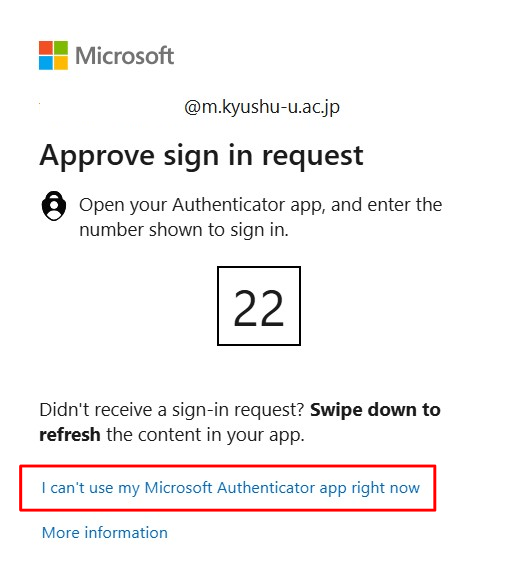
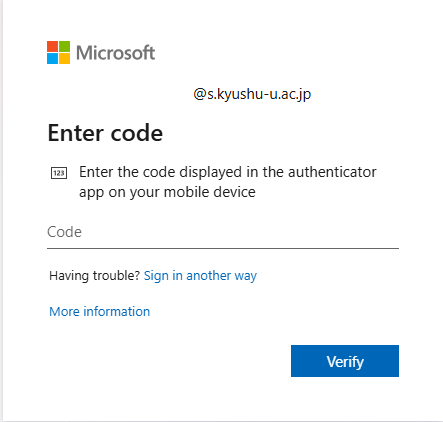
Select “I can’t use my Microsoft Authenticator app right now” or “Sign in another way”.
-
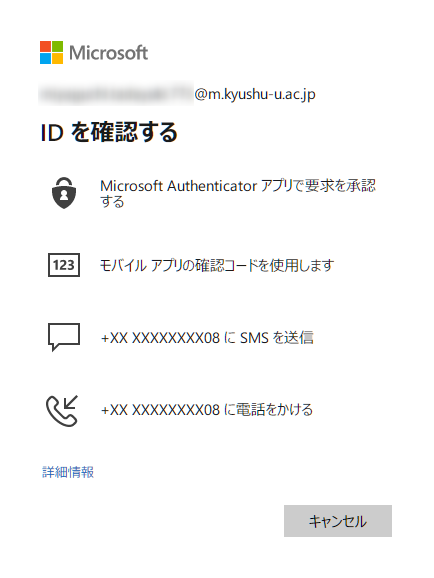
Select “Call” and follow the instructions.
If you select “Call”:
You will receive a call on the phone number you entered. Follow the voice instructions. You may be asked to press the # key during the voice prompts.
Note for office landlines: If pressing # alone doesn’t work, you may need to press the “PB Send” button to enable tone signaling before pressing #.
If the Issue Is Not Resolved
Please contact the support desk in the following cases:
- You are unable to register a phone number
- You still cannot sign in after registration
- You cannot recover access because none of the methods are available